
Why Attribution Models Matter
A customer sees your Facebook ad, clicks a Google search result a week later, then converts through an email link. Which channel gets credit?
The answer depends on your attribution model — the ruleset that assigns conversion credit to marketing touchpoints.
Get attribution wrong, and you’ll cut budgets from channels that actually drive growth. I’ve seen companies kill their top-of-funnel campaigns because last-click attribution made them look worthless — then watched conversions drop 30% over the following quarter.
Attribution isn’t just a reporting preference. It’s a strategic decision that shapes budget allocation.
The 6 Attribution Models Explained
Let’s use a real example throughout. Imagine this customer journey:
- Day 1: Clicks Facebook ad
- Day 5: Clicks organic search result
- Day 8: Clicks Google Ads
- Day 12: Clicks email link → Converts ($100)
Here’s how each model distributes the $100 conversion value:
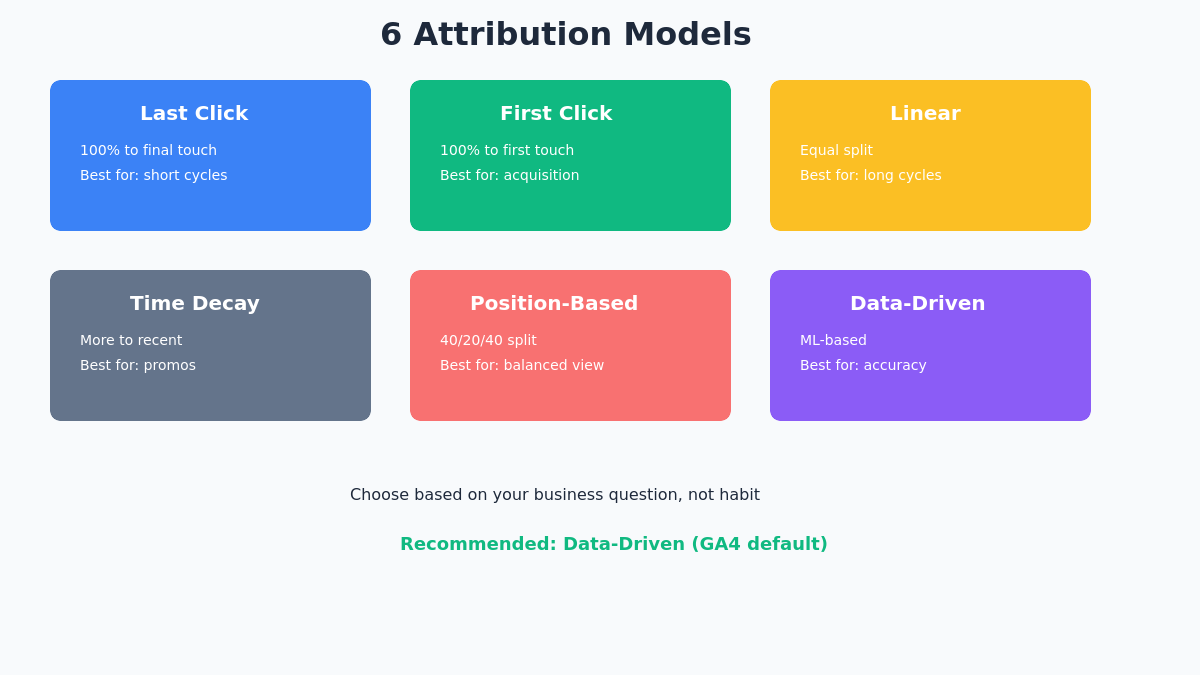
Last Click
First Click
Linear
Time Decay
Position-Based
Data-Driven (DDA)
1. Last Click
Rule: 100% credit to the final touchpoint before conversion.
| Channel | Credit |
|---|---|
| $0 | |
| Organic Search | $0 |
| Google Ads | $0 |
| $100 |
Best for: Short sales cycles, direct response campaigns.
Problem: Completely ignores awareness and consideration phases. Makes demand generation look like a waste of money.
2. First Click
Rule: 100% credit to the first touchpoint that introduced the customer.
| Channel | Credit |
|---|---|
| $100 | |
| Organic Search | $0 |
| Google Ads | $0 |
| $0 |
Best for: Understanding which channels drive new audience acquisition.
Problem: Ignores everything that happened after awareness. A channel that brings tire-kickers who never buy still looks good.
3. Linear
Rule: Equal credit to every touchpoint in the journey.
| Channel | Credit |
|---|---|
| $25 | |
| Organic Search | $25 |
| Google Ads | $25 |
| $25 |
Best for: Long consideration cycles where every touchpoint matters.
Problem: Not all touchpoints contribute equally. A glance at a display ad shouldn’t equal clicking a high-intent search ad.
4. Time Decay
Rule: More credit to touchpoints closer to conversion. Uses a 7-day half-life (touchpoints 7 days before conversion get half the credit of those at conversion).
| Channel | Credit |
|---|---|
| Facebook (Day 1) | $10 |
| Organic Search (Day 5) | $20 |
| Google Ads (Day 8) | $30 |
| Email (Day 12) | $40 |
Best for: Promotional campaigns, time-sensitive offers.
Problem: Still undervalues initial awareness. The Facebook ad that started the journey gets minimal credit.
5. Position-Based (U-Shaped)
Rule: 40% to first touch, 40% to last touch, 20% split among middle interactions.
| Channel | Credit |
|---|---|
| Facebook (First) | $40 |
| Organic Search | $10 |
| Google Ads | $10 |
| Email (Last) | $40 |
Best for: Balanced view that values both acquisition and conversion.
Problem: The 40/40/20 split is arbitrary. Why not 30/30/40?
6. Data-Driven Attribution (DDA)
Rule: Machine learning analyzes all conversion paths and assigns credit based on actual impact.
| Channel | Credit (example) |
|---|---|
| $35 | |
| Organic Search | $15 |
| Google Ads | $30 |
| $20 |
Best for: Most situations. It’s now the default in GA4 and Google Ads.
How it works: DDA compares converting paths to non-converting paths and identifies which touchpoints actually increased conversion probability. Learn more in the official GA4 attribution documentation.
Requirement: Needs sufficient conversion volume to build accurate models. Google recommends 300+ conversions per month for reliable results.
Comparing Models: A Practical Exercise
Here’s what I recommend to every client: run the same report with 3 different attribution models and compare.
In GA4, go to Advertising → Attribution → Model Comparison. Or try our Attribution Model Playground to simulate a customer journey and see exactly how each model redistributes credit across channels.
Compare Last Click, First Click, and Data-Driven. You’ll likely see:
| Channel | Last Click | First Click | Data-Driven |
|---|---|---|---|
| Direct | High | Low | Medium |
| Paid Social | Low | High | Medium |
| Organic Search | Medium | Medium | Medium |
| High | Low | Medium | |
| Paid Search | High | Medium | High |
Key insight: If a channel shows high value in first-click but low in last-click, it’s an awareness driver. If it’s high in last-click but low in first-click, it’s a closer. Data-driven usually shows something in between.
Attribution in GA4 vs Google Ads
Here’s a common point of confusion: GA4 and Google Ads can show different conversion numbers for the same campaign.
Why?
- GA4 uses cross-channel attribution — it considers all touchpoints including organic, direct, email
- Google Ads only attributes to Google Ads clicks (paid search, display, YouTube)
Example: User clicks Google Ad → Clicks organic result → Converts
- Google Ads (DDA): May give 60% credit to the ad click
- GA4 (DDA): May give 40% credit to Google Ads, 60% to organic
Neither is wrong. They’re answering different questions. For details on how Google Ads handles attribution, see the Google Ads attribution models guide.
Google Analytics 4
- Cross-channel attribution
- All touchpoints included (organic, direct, email, paid, referral)
- Data-driven as default model
- Neutral measurement source
Google Ads
- Ads-only attribution
- Only paid Google touchpoints (Search, Display, YouTube)
- Data-driven as default model
- Optimized for bid strategy
Choosing the Right Model
There’s no universally “correct” model. Choose based on your business question:
| Question | Model |
|---|---|
| Which channels drive new customers? | First Click |
| Which channels close the sale? | Last Click |
| How do all channels contribute? | Linear or Data-Driven |
| What’s the most accurate picture? | Data-Driven |
| Which channels work for time-sensitive promos? | Time Decay |
My recommendation: Use Data-Driven as your primary model (it’s the GA4 default anyway). But regularly compare with first-click to understand your awareness channels.
Use Data-Driven Attribution as your primary model. It is the GA4 default and adapts to your actual conversion patterns. Then, regularly compare with First Click attribution to identify which channels are driving awareness and bringing new users into the funnel. This two-model approach gives you both accuracy and strategic insight.
Attribution Lookback Windows
The lookback window determines how far back GA4 looks for touchpoints before a conversion.
Default settings in GA4:
- Acquisition events: 30 days
- All other events: 90 days
You can adjust these in Admin → Attribution Settings.
When to extend the window:
- B2B with long sales cycles (consider 90 days)
- High-consideration purchases (real estate, cars, enterprise software)
When to shorten:
- Impulse purchases
- Flash sales and promotions
- Low-cost items
Common Attribution Mistakes
FAQ
What attribution model does GA4 use by default?
Data-driven attribution is the default in GA4. It uses machine learning to assign credit based on actual conversion patterns in your data.
Can I still use last-click in GA4?
Yes. Go to Admin → Attribution Settings and select your preferred model. You can also compare models in the Attribution reports without changing the default.
How much data does data-driven attribution need?
Google recommends at least 300 conversions per month for reliable data-driven attribution. With less data, the model may be less accurate, but it still works.
Why do Google Ads and GA4 show different conversion numbers?
Google Ads only attributes to Google Ads touchpoints. GA4 considers all channels. They’re both right — they’re just measuring different things.
Take Action on Attribution
Attribution isn’t just a reporting setting — it’s a lens that shapes how you see your marketing performance.
Your next steps:
- Check your current attribution model in GA4 (Admin → Attribution Settings)
- Run a model comparison report to see how channels perform differently
- Look at the Conversion Paths report to understand typical customer journeys
- Discuss with your team which model best fits your business questions
Related reading: